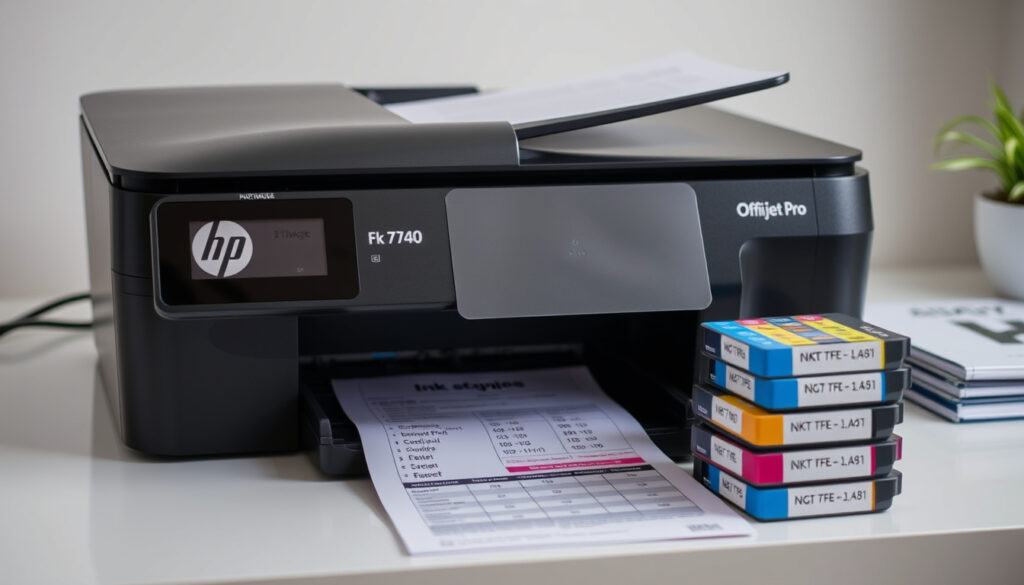
HP OfficeJet Pro 7740 Ink: Costs, Cartridges & Guide
Anyone who’s watched printer ink prices climb knows the ritual: wait for the low-ink warning, wince at the price, then wonder if third-party ink is worth the risk. The HP OfficeJet Pro 7740 makes that decision sharper, because its cartridge naming splits by region and prices stay premium. HP Canada (official HP store) lists the 7740 as designed for 952 and 952XL cartridges, while HP EMEA/Africa product specifications (official spec sheet) rate 953XL color at about 1,600 pages each.
Printer Model: HP OfficeJet Pro 7740 Wide Format All-in-One ·
Ink Cartridge Series: HP 952 and 952XL (North America) ·
High-Yield Color Yield: ~1,600 pages per cartridge (Best Buy Canada (electronics retailer)) ·
Cartridges per Set: 4 (black, cyan, magenta, yellow) ·
Ink Type: Pigment-based (HP Support Community (HP-run user forum))
Quick snapshot
- HP 7740 is designed for HP 952 and 952XL cartridges (HP Canada (official HP store)).
- HP’s EMEA/Africa spec page also lists 953/953XL and 957XL support (HP EMEA/Africa product specifications (official spec sheet)).
- High-yield 952XL color is rated around 1,600 pages per cartridge (Best Buy Canada (electronics retailer)).
- Whether the 7740 is officially discontinued — no HP statement was located.
- Exact cost per page depends on document coverage, settings, and cartridge version.
- Long-term reliability of off-brand cartridges is not documented in tier-1 sources.
- Best Buy Canada still lists 7740 cartridges, a sign the model remains in the retail channel (Best Buy Canada (electronics retailer)).
- No recall or end-of-support notice appears in HP’s published user guide for the 7740 (HP OfficeJet Pro 7740 User Guide (manufacturer manual)).
- For current owners: step up to 952XL high-yield cartridges, rated around 2,000 black pages (Best Buy Canada (electronics retailer)).
- For new buyers: confirm current 7740 availability and cartridge naming on HP’s official page (HP Canada (official HP store)).
A dozen specs, one pattern: high-yield cartridges change the economics of every page the 7740 prints.
| Spec | Value |
|---|---|
| Printer model | HP OfficeJet Pro 7740 Wide Format All-in-One |
| Official ink series (North America) | HP 952 and 952XL (HP Canada (official HP store)) |
| Official ink series (EMEA/Africa listings) | HP 953/953XL and 957XL (HP EMEA/Africa product specifications (official spec sheet)) |
| Cartridges per set | 4 individual cartridges — black, cyan, magenta, yellow (HP Canada (official HP store)) |
| Ink technology | Pigment-based, fade resistant and water resistant (HP Support Community (HP-run user forum)) |
| Standard black yield | ~700–1,000 pages (HP 952 black, Best Buy Canada (electronics retailer)); ~1,000 pages (HP 953 black, HP EMEA/Africa product specifications (official spec sheet)) |
| Standard color yield | ~630 pages (HP 952 color, Best Buy Canada (electronics retailer)); ~700 pages (HP 953 color, HP EMEA/Africa product specifications (official spec sheet)) |
| High-yield black yield | ~2,000 pages (HP 952XL/953XL black, Best Buy Canada (electronics retailer) / HP EMEA/Africa product specifications (official spec sheet)) |
| High-yield color yield | ~1,600 pages per color (HP 952XL/953XL, Best Buy Canada (electronics retailer) / HP EMEA/Africa product specifications (official spec sheet)) |
| Extra high-yield black | ~3,000 pages (HP 957XL, HP EMEA/Africa product specifications (official spec sheet)) |
| Design rule | Use cartridges until empty; early refill may cause failure (HP OfficeJet Pro 7740 User Guide (manufacturer manual)) |
What ink cartridges are compatible with the HP OfficeJet Pro 7740 printer?
Short answer: four individual cartridges, and the series name depends on which HP regional page you check.
HP 952 vs HP 953 cartridges
- HP Canada’s cartridge page lists the 7740 as designed for original HP 952 and 952XL cartridges (HP Canada (official HP store)).
- HP’s EMEA/Africa specifications list HP 953, 953XL, and 957XL support for the 7740 (HP EMEA/Africa product specifications (official spec sheet)).
- Best Buy Canada summarizes the same printer as using 952 standard or 952XL high-yield in North America (Best Buy Canada (electronics retailer)).
HP’s regional pages use different names for what is functionally the same ink family. Order by printer model, not by series name alone.
Official HP cartridges list
- Original part numbers listed by HP Canada include F6U15AN, L0S49AN, L0S52AN, L0S55AN, F6U19AN, L0S61AN, L0S64AN, L0S67AN, and N9K27AN (HP Canada (official HP store)).
- The 7740 takes four separate cartridges, so you replace only the empty color (HP Canada (official HP store)).
Third-party compatible options
- Compatible and remanufactured cartridges are sold widely, but HP does not list them as approved options (HP Support Community (HP-run user forum)).
- Best Buy Canada sells compatible alternatives alongside genuine cartridges, with prices below HP’s own (Best Buy Canada (electronics retailer)).
- If you try one, keep the packaging and receipt in case of leaks or early failure.
What this means: compatibility is simple — four cartridges from the 952/953 family — but regional naming is the trap. The cartridge number printed on your current cartridge is the one to reorder.
Why is HP ink so expensive now?
HP’s ink pricing looks irrational until you see what is inside the cartridge and what HP promises because of it.
Research and development costs
- HP’s support community describes 952-series ink as pigment based, fade resistant, and more water resistant than dye-based inks (HP Support Community (HP-run user forum)).
- The 7740 user guide specifies a cartridge design meant to run until empty — reliability engineering that cheaper cartridges do not advertise (HP OfficeJet Pro 7740 User Guide (manufacturer manual)).
Proprietary technology
- HP recommends original cartridges for consistent quality; the support forum says third-party ink can compromise print quality and reliability (HP Support Community (HP-run user forum)).
- HP states high-yield cartridges generally offer a lower cost per page and fewer cartridge changes, which is why the XL versions exist at a premium sticker price (HP Canada (official HP store)).
Comparison with third-party prices
- Retailers such as Best Buy Canada sell compatible cartridges below genuine HP pricing, which is why the price gap feels jarring (Best Buy Canada (electronics retailer)).
- HP’s published yields show the per-page gap narrowing when you move to XL cartridges (HP EMEA/Africa product specifications (official spec sheet)).
The catch: you are paying for reliability engineering and published yields, not just colored liquid — and the XL cartridge is where that engineering starts paying you back.
What is the cheapest way to buy HP ink?
The cheapest ink for the 7740 is not the cheapest cartridge; it is the one with the lowest cost per page.
Buying high-yield cartridges
- HP says high-yield cartridges generally offer a lower cost per page and fewer cartridge changes (HP Canada (official HP store)).
- Published yields: 953XL black around 2,000 pages versus 953 black around 1,000; 953XL color around 1,600 versus 953 color around 700 (HP EMEA/Africa product specifications (official spec sheet)).
Using HP Instant Ink subscription
- HP markets Instant Ink as a subscription that lowers per-page ink costs; eligibility changes over time, so confirm 7740 support on HP’s Instant Ink page before buying.
- The same value logic applies to the printer itself: our Best Budget 3D Printers 2026: Top Picks for Every Price Range guide ranks machines by running cost, not just sticker price.
Considering remanufactured or compatible cartridges
- Compatible cartridges are cheaper at checkout and widely stocked by retailers like Best Buy Canada (Best Buy Canada (electronics retailer)).
- HP’s support community warns that non-HP ink may damage the printhead or ink delivery system (HP Support Community (HP-run user forum)).
Where to find discounts
- The 957XL black cartridge, rated around 3,000 pages, is the lowest-cost-per-page black option in the 7740 lineup (HP EMEA/Africa product specifications (official spec sheet)).
- Buying genuine cartridges in the XL tier reduces how often you reorder, which cuts both cost and downtime (HP Canada (official HP store)).
The trade-off: genuine XL cartridges lose on sticker price but win on safety and per-page cost; compatible cartridges win the upfront price and make the printer the test bed.
For anyone printing more than a few pages a week, the 952XL/953XL route is the cheapest legitimate option: about 2,000 black pages per cartridge at HP’s published yields (HP EMEA/Africa product specifications (official spec sheet)).
How to replace ink for HP OfficeJet Pro 7740?
Replacing ink on the 7740 takes about two minutes, needs no tools, and is hard to get wrong once you know the release mechanism.
Preparing the printer
- Turn the printer on and open the cartridge access door; the carriage moves to the ink access area (HP OfficeJet Pro 7740 User Guide (manufacturer manual)).
- Keep the replacement cartridge packaged until you are ready to install it.
- HP’s manual says the printer is designed for cartridges to be used until they are empty; refilling early can cause the printer to fail (HP OfficeJet Pro 7740 User Guide (manufacturer manual)).
Removing the old cartridge
Press down firmly on the top of the cartridge to release it; pulling before release can damage the carriage or cartridge slot (HP OfficeJet Pro 7740 User Guide (manufacturer manual)).
- Wait for the carriage to stop moving in the access area.
- Press down on the empty cartridge until it releases.
- Pull the cartridge straight out of its slot.
- Repeat for any other empty cartridges before installing replacements.
Installing the new cartridge
- Remove the new cartridge from its packaging, then pull off the protective tape.
- Touch only the plastic body; avoid the copper contacts and the ink nozzles.
- Slide the cartridge into the slot with the label facing up until it clicks into place.
Aligning cartridges
- Close the access door; the printer may prompt you to align or it may print an alignment page automatically.
- Follow the on-screen instructions; if an alignment page prints, place it face-down on the scanner glass when prompted.
- If alignment fails repeatedly, check that all protective tape was removed and reseat the cartridge (HP OfficeJet Pro 7740 User Guide (manufacturer manual)).
Is it okay to use an off brand of ink for my HP printer?
The honest answer: off-brand ink works for many 7740 owners in the short term, but HP’s own support community documents the risks.
Risks of off-brand ink
HP’s support community says third-party or off-brand ink can compromise print quality and reliability, and non-HP ink may damage the printhead or ink delivery system (HP Support Community (HP-run user forum)).
- Print quality: color consistency and reliability are the first things HP’s forum says third-party ink can compromise (HP Support Community (HP-run user forum)).
- Hardware: the same post says non-HP ink may damage the printhead or ink delivery system (HP Support Community (HP-run user forum)).
Warranty exposure
- HP’s support community notes that warranty issues can arise if damage is caused by non-HP ink (HP Support Community (HP-run user forum)).
- HP’s user guide keeps the design scope on original cartridges used until empty; anything else falls outside that tested design (HP OfficeJet Pro 7740 User Guide (manufacturer manual)).
The implication: off-brand ink is a budget play, not a reliability play. One bad cartridge can turn a $60 saving into a failed printhead, so test before you depend on it.
HP 952 standard vs HP 953 high-yield vs compatible cartridges: side-by-side
Three ways to keep the 7740 printing, one pattern: every dollar saved at the register shows up later in yields, frequency, or risk.
| Route | Typical black yield | Typical color yield | Cost per page | Biggest risk |
|---|---|---|---|---|
| HP 952 standard (genuine) | ~700–1,000 pages (Best Buy Canada (electronics retailer)) | ~630–700 pages (Best Buy Canada (electronics retailer), HP EMEA/Africa product specifications (official spec sheet)) | High | None; full HP support |
| HP 952XL / 953XL high-yield (genuine) | ~2,000 pages (Best Buy Canada (electronics retailer), HP EMEA/Africa product specifications (official spec sheet)) | ~1,600 pages per color (Best Buy Canada (electronics retailer), HP EMEA/Africa product specifications (official spec sheet)) | Lower | Higher upfront price |
| HP 957XL extra high-yield black | ~3,000 pages (HP EMEA/Africa product specifications (official spec sheet)) | — | Lowest per black page | Availability |
| Compatible / off-brand | Not guaranteed (Best Buy Canada (electronics retailer)) | Not guaranteed | Lowest sticker price | Quality and hardware damage documented by HP forum (see off-brand section) |
The pattern: genuine high-yield cartridges move the battle from sticker price to per-page cost; compatible cartridges only win if quality and hardware risk stay quiet.
HP OfficeJet Pro 7740 ink specifications
Eight numbers determine what the 7740 costs to run, one pattern: every extra page in a cartridge lowers the price of each sheet you print.
| Specification | Value |
|---|---|
| Cartridge series | HP 952/952XL (North America); HP 953/953XL and 957XL listed on EMEA/Africa page (HP Canada (official HP store), HP EMEA/Africa product specifications (official spec sheet)) |
| Cartridges per set | 4 — black, cyan, magenta, yellow (HP Canada (official HP store)) |
| Standard black yield | ~1,000 pages (HP 953 black, HP EMEA/Africa product specifications (official spec sheet)); ~700–1,000 (HP 952 black, Best Buy Canada (electronics retailer)) |
| Standard color yield | ~700 pages per color (HP 953, HP EMEA/Africa product specifications (official spec sheet)); ~630 (HP 952 color, Best Buy Canada (electronics retailer)) |
| High-yield black yield | ~2,000 pages (HP 953XL, HP EMEA/Africa product specifications (official spec sheet)); ~2,000 (HP 952XL, Best Buy Canada (electronics retailer)) |
| High-yield color yield | ~1,600 pages per color (HP 953XL, HP EMEA/Africa product specifications (official spec sheet)); ~1,600 (HP 952XL, Best Buy Canada (electronics retailer)) |
| Extra high-yield black | ~3,000 pages (HP 957XL, HP EMEA/Africa product specifications (official spec sheet)) |
| Ink technology | Pigment-based, fade resistant and water resistant (HP Support Community (HP-run user forum)) |
| Setup cartridges | Page yields may differ from replacement cartridges (HP setup guide (manufacturer documentation)) |
| Usage rule | Designed to be used until empty; refilling early may cause printer failure (HP OfficeJet Pro 7740 User Guide (manufacturer manual)) |
The trade-off: the 7740’s ink system is well engineered, but that engineering is exactly why the official cartridges carry the prices they do.
Upsides and downsides of the HP OfficeJet Pro 7740 ink system
Upsides
- Four individual cartridges — replace only the color that runs out (HP Canada (official HP store)).
- High-yield XL cartridges lower cost per page and reduce change frequency (HP Canada (official HP store)).
- Pigment-based ink resists fading and water better than dye-based inks (HP Support Community (HP-run user forum)).
- Tool-free cartridge replacement in about two minutes (HP OfficeJet Pro 7740 User Guide (manufacturer manual)).
Downsides
- Genuine cartridges carry a premium sticker price (Best Buy Canada (electronics retailer)).
- Regional naming differences (952 vs 953) make online orders error-prone (HP Canada (official HP store), HP EMEA/Africa product specifications (official spec sheet)).
- HP warns that refilling before empty can cause printer failure (HP OfficeJet Pro 7740 User Guide (manufacturer manual)).
- Off-brand ink risks print quality and hardware damage (HP Support Community (HP-run user forum)).
The trade-off: a well-engineered ink system is a pleasure to maintain, and the same engineering keeps the official ink expensive.
What’s confirmed, what’s still unclear
The research pack settles cartridge compatibility completely; two questions genuinely remain open.
Confirmed facts
- HP 7740 is designed for HP 952 and 952XL cartridges (HP Canada (official HP store)).
- HP’s EMEA/Africa page lists 953/953XL and 957XL support (HP EMEA/Africa product specifications (official spec sheet)).
- High-yield color yields are around 1,600 pages per cartridge (HP EMEA/Africa product specifications (official spec sheet), Best Buy Canada (electronics retailer)).
- HP’s manual says cartridges are designed to be used until empty (HP OfficeJet Pro 7740 User Guide (manufacturer manual)).
What’s unclear
- Whether the 7740 is discontinued — no official HP statement was located.
- Real-world page yields vary with document coverage and print settings (Best Buy Canada (electronics retailer)).
- Long-term reliability of off-brand cartridges is not documented in tier-1 sources.
- HP’s regional cartridge naming is inconsistent across its own pages (HP Canada (official HP store), HP EMEA/Africa product specifications (official spec sheet)).
The takeaway: trust the confirmed list when you buy, and treat the unclear list as the fine print.
What HP documentation and users say about ink reliability
Three voices define the 7740 ink debate: a user’s experience, the manufacturer’s manual, and a retailer’s yield data.
“HP 952 ink cartridges are pigment based. They are fade resistant and more water resistant than dye based inks.”
— HP Support Community user (2019), in HP Support Community (HP-run user forum)
“The printer is designed for ink cartridges to be used until they are empty.”
— HP OfficeJet Pro 7740 User Guide (manufacturer manual)
“HP 952 black cartridges are commonly rated around 700 to 1,000 pages and HP 952XL black cartridges around 2,000 pages, with actual output varying by document and settings.”
— Best Buy Canada (electronics retailer)
Why this matters: HP’s credibility rests on print quality, and both the manual and retailers keep repeating the same caveat — yields are estimates until your documents prove otherwise.
Summary: the real cost of HP 7740 ink
HP’s ink pricing makes sense once you stop looking at sticker price and start looking at yield. For 7740 owners, the practical move is high-yield 952XL or 953XL cartridges — about 2,000 black pages and 1,600 per color at HP’s published ratings (HP EMEA/Africa product specifications (official spec sheet)) — with one genuine spare for deadline moments. If budget pressure pushes you toward compatible cartridges, test a single cartridge before committing to a full set, because HP’s own forum documents print-quality and hardware risks (HP Support Community (HP-run user forum)). For anyone printing from a small office or home office, the choice is clear: price your per-page cost before you click buy, or overpay for ink every single time.
Related reading
- Best Budget 3D Printers 2026: Top Picks for Every Price Range
- Cheapest Hybrid Car NZ 2026: Best New & Used Models Under $10k-$20k
The same value-per-dollar logic applies beyond ink: budget printer picks and low-cost car comparisons follow the same cost-per-use math.
images-eu.ssl-images-amazon.com, h10032.www1.hp.com, ldproducts.com, h10032.www1.hp.com, h30434.www3.hp.com, rtings.com
Frequently asked questions
Can I use HP 952 cartridges in other printers?
HP’s Canadian store pairs the 7740 with HP 952 and 952XL cartridges. If you own another OfficeJet Pro model, check that printer’s manual or HP’s cartridge page to confirm the series it takes before buying (HP Canada (official HP store)).
How many pages does a standard HP 952 cartridge print?
Best Buy Canada rates HP 952 black at about 700 to 1,000 pages and HP 952 color at about 630 pages; HP’s EMEA/Africa spec sheet lists 953 black at about 1,000 pages and 953 color at about 700 (Best Buy Canada (electronics retailer), HP EMEA/Africa product specifications (official spec sheet)).
Does HP Instant Ink work with OfficeJet Pro 7740?
HP markets Instant Ink as a subscription that lowers per-page ink costs for eligible printers. Compatibility changes over time, so HP’s Instant Ink page is the only reliable place to confirm current 7740 support.
Are compatible cartridges covered under HP warranty?
HP’s support community says warranty issues can arise if non-HP ink causes damage (HP Support Community (HP-run user forum)). If you use compatible cartridges and later have a hardware failure, the warranty question will hinge on whether the ink caused the damage.
How do I reset the ink level after refilling?
HP’s user guide warns that refilling cartridges before they are empty might cause the printer to fail, and the 7740 manual does not include a supported reset procedure (HP OfficeJet Pro 7740 User Guide (manufacturer manual)).
Can I refill HP 952 cartridges?
Physically, yes; officially, no. HP designs the 7740’s cartridges to be used until empty and warns that refilling early can cause printer failure (HP OfficeJet Pro 7740 User Guide (manufacturer manual)).
What are the best remanufactured cartridges for HP 7740?
The research pack does not name one best brand. The safer route is a remanufacturer that states its page yield, covers leaks or failures with its own warranty, and accepts returns; test one cartridge before buying a full set.
More related posts
 How Did MrBeast Coach Tyler Wall Die? Kratom Toxicity Explained
 Art for Kids Hub: Who is Rob Jensen, Ages, Free Lessons & More
 From Old Country Bumpkin to Master Swordsman Season 2 Guide
 Who Is the Cheapest Electricity Company in NZ? 2026 Comparison
 The Sands Browns Bay: Retirement Living & Care Guide
 Wellington to Nelson Flights: Cheap Deals & Schedules
 Best Website Design Company in Auckland: Top Clutch Picks
 Customer Service Jobs Auckland: No Experience, Remote & Part-Time